How to Wear and Adjust Your Walla Sound Beat
Your Walla Sound Beat sounds its best when the two speaker pads rest firmly on your cheekbones, just in front of your ears. This guide shows you how to put them on, how to tighten the fit with the Nylon Adjuster included in the box, and how to fix the most common fit problems in under a minute.
Why fit changes the sound
Bone-conduction headphones don't play sound into your ear canal. The pads send tiny vibrations through your cheekbones straight to your inner ear, so your ears stay open to traffic, coaches, and conversation around you.
Because the sound travels through bone, contact is everything. If a pad lifts off your cheekbone, even slightly, music can sound thin, quiet, or tinny. If one pad sits looser than the other, that side sounds weaker. Most "low volume" and "tinny sound" reports we see come from fit, not from a faulty unit.
When the fit is right, you get what the Walla Sound Beat was built for:
-
Open-ear awareness for safer runs, rides, and commutes
-
Workout-ready IPX8 waterproof design
-
Phone-free listening with 32 GB of built-in MP3 storage and 5+ hours of playtime
What's in the box
You'll find three things in the box, plus a quick-start card with a QR code to the full manual:
-
Walla Sound Beat headphones
-
Magnetic charging cable
-
Nylon Adjuster
The buttons you'll use while wearing them (Volume +, Volume − and Power) sit together on one arm, so you can find them by touch.
How to wear your Walla Sound Beat
The pads go on your cheekbones, not in or on your ears. Follow these five steps:
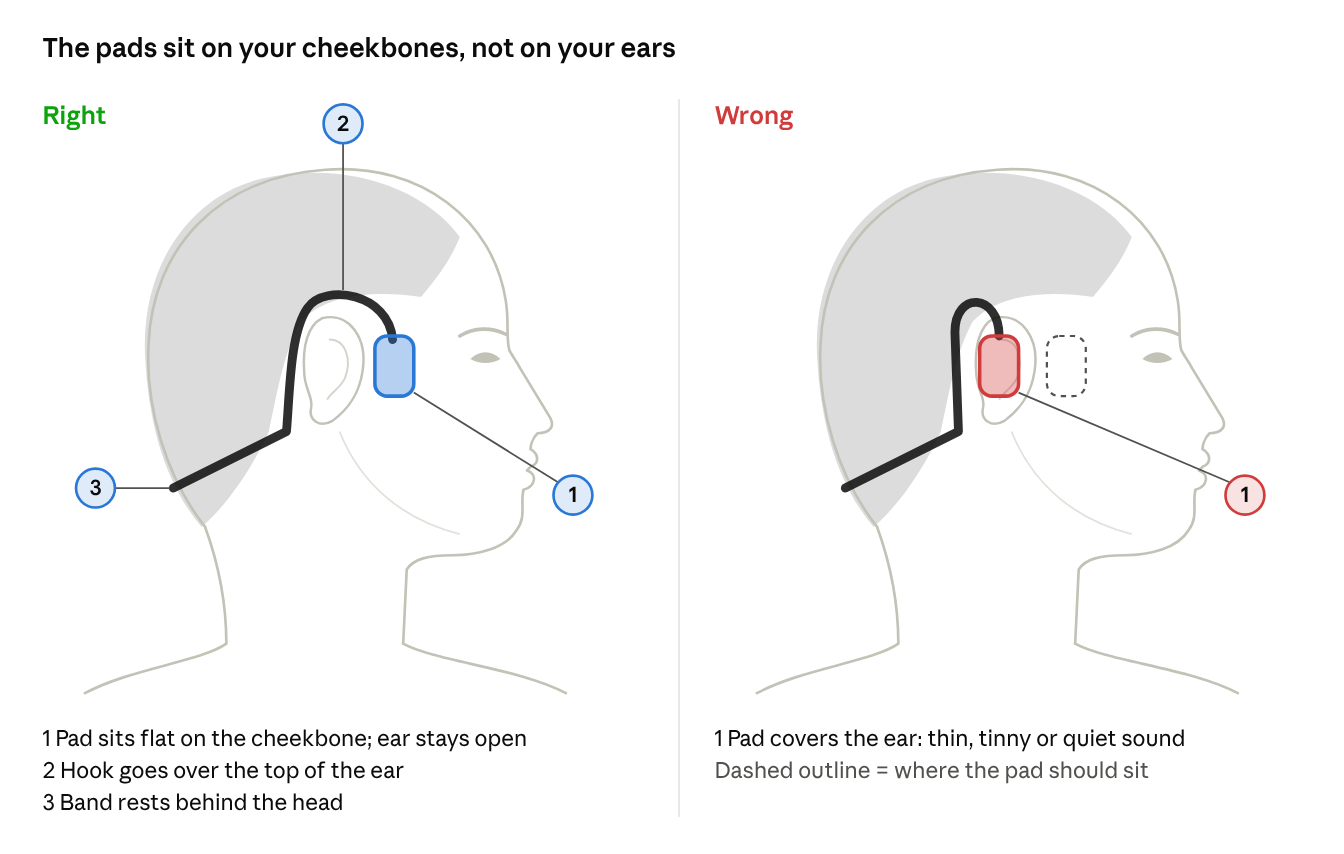
Pad placement · right vs wrong
-
Hold them the right way round. Pads facing forward, the neckband behind you, and the arm with the buttons on the side where you'll reach for them.
-
Hook over your ears. Slip each ear hook over the top of your ear, from front to back, like the arms of a pair of glasses.
-
Let the band rest behind your head. The neckband should sit at the back of your head or upper neck. It doesn't need to touch your skin all the way round; a small gap is normal.
-
Seat the pads on your cheekbones. Each pad sits just in front of the small flap at the front of your ear (the tragus), resting flat on the bone. It should not cover your ear opening.
-
Fine-tune with music playing. Play a song at medium volume and slide each pad a few millimetres forward or back. Stop where the sound is fullest and both sides sound equally loud.
The right fit feels snug but light. If the pads lift off your cheekbones when you turn your head or start moving, add the Nylon Adjuster (next section).
How to attach and adjust the Nylon Adjuster
The adjuster ties straight across the neckband, pulling the two sides of the band closer together. A smaller band presses the pads more firmly onto your cheekbones, which gives you fuller sound and a fit that stays put during runs and workouts. It's especially helpful for smaller heads.
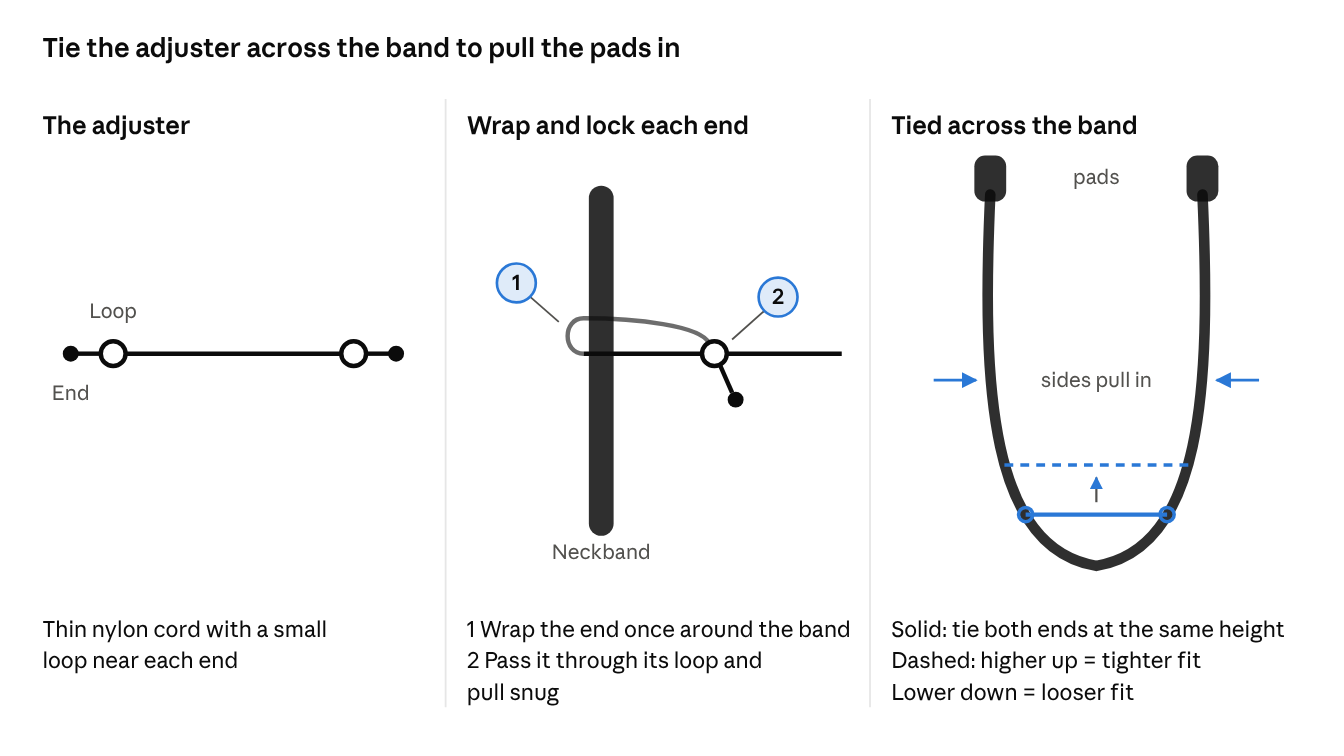
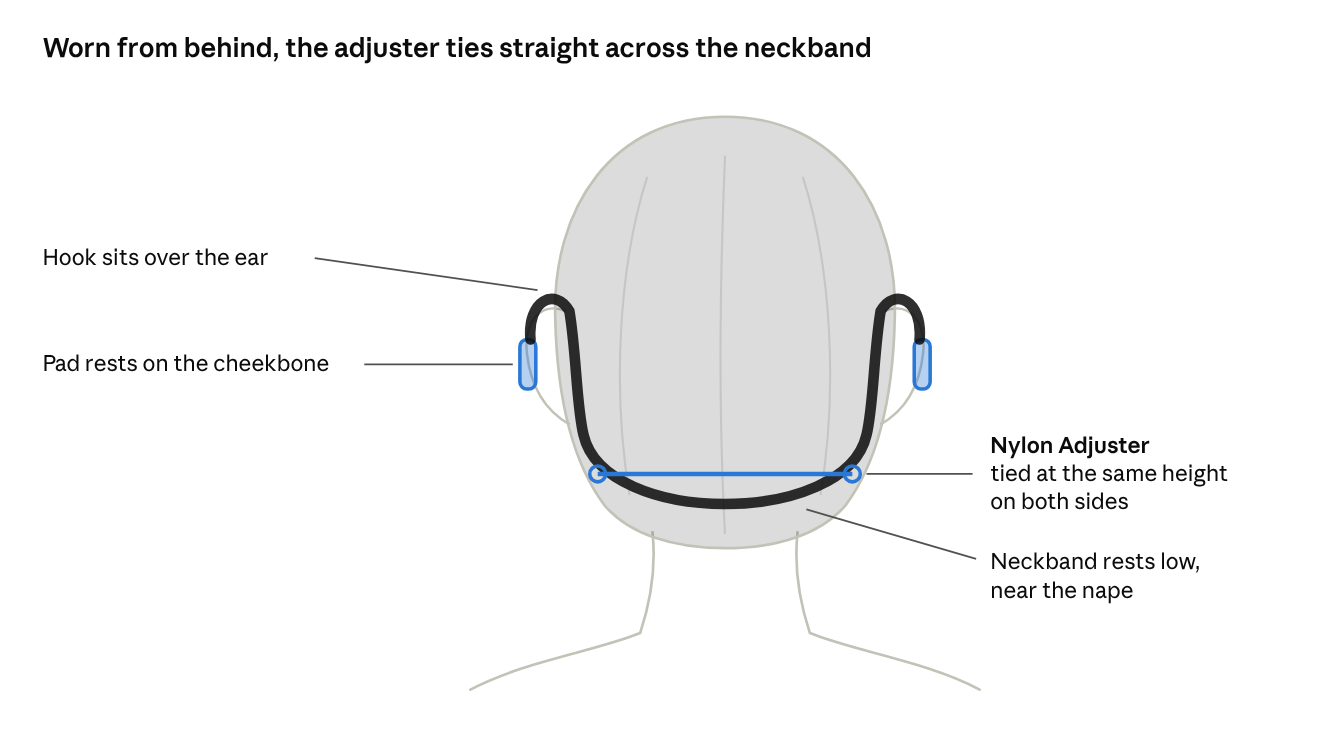
Doesn't sound right? Check the fit first
Most sound problems disappear once both pads sit flat on your cheekbones. Find what you're hearing below:
|
What you notice |
Likely cause |
Quick fix |
|---|---|---|
|
Thin, tinny or quiet sound |
Pads aren't touching your cheekbones, or are sitting on your ears |
Move each pad forward onto the cheekbone, just in front of the ear. Add the Nylon Adjuster if they keep lifting off. |
|
One side quieter than the other |
Uneven pressure, an off-centre adjuster, or hair under one pad |
Re-seat both pads, attach the adjuster at the same height on both sides, and tuck hair away. Also check your phone's left/right audio balance in its accessibility settings. |
|
Headphones slip or bounce when you run |
The band is too loose for your head |
Attach the adjuster and move it up the band one step at a time. |
|
Band bumps your collar, hood or helmet |
The band is sitting too low |
Tilt the band up so it rests higher on the back of your head. |
|
Ticklish buzzing on your skin |
Strong vibration at high volume |
This is normal for bone conduction. Lower the volume a step or shift the pads slightly. |
|
Sound fades in loud places |
Open ears let traffic and wind noise in |
Turn the volume up a little. For the fullest sound in very loud places, wear a soft foam earplug. |
Tips for every activity
-
Running and gym workouts: Attach the Nylon Adjuster before you start. A snug band stops the pads bouncing off your cheekbones mid-stride.
-
Cycling with a helmet: Put the headphones on first, then lower the helmet over them. Make sure the helmet straps don't press on the band and lift the pads.
-
With glasses: Put the headphones on, then your glasses. Rest the glasses' arms above or below the ear hooks so they don't push the pads off your cheekbones.
-
Swimming: The IPX8 design is factory tested at 2 m for 2 hours. Load music into the 32 GB built-in storage and use MP3 mode, since Bluetooth signals don't travel well through water. A swim cap over the band helps keep everything in place.
-
Hats and beanies: Wear the hat over the band, not under the pads, so nothing comes between the pads and your cheekbones.
After you wear them
-
Wipe off sweat and water after every workout, especially around the magnetic charging contacts. Kept clean and dry, they resist corrosion and connect reliably when you charge.
-
Rinse with fresh water after a swim, then dry thoroughly. Don't soak them in seawater or salt water.
-
Charge them correctly. The magnetic connector only fits one way. If it pushes away, flip it over and reconnect. A red light means charging; solid blue means fully charged.
Frequently asked questions
Q: Why don't they sound like my earbuds?
A: Earbuds seal your ear canal and push sound straight in. Bone-conduction headphones leave your ears open, so you hear your music and your surroundings together. The sound is clear and full once the pads sit firmly on your cheekbones, with a lighter, more open feel than earbuds.
Q: Should the pads touch my ears?
A: No. The pads rest on your cheekbones, just in front of your ears. Your ear opening stays uncovered.
Q: Is the vibration I feel normal?
A: Yes. That's how bone conduction delivers sound. You'll notice it most at high volume or with heavy bass.
Q: Can people around me hear my music?
A: At normal volume, very little. At high volume in a quiet room, people close to you may hear a faint sound.
Q: The fit still feels loose, even with the adjuster.
A: Move both attachment points one step higher up the band, keeping them level. Then re-seat the pads on your cheekbones and test with music again.
Q: The light started flashing red while I was listening. Is something wrong?
A: No. A flashing red light during use means the battery is low and only a few minutes of play remain. Charge the headphones with the magnetic cable.
Need help?
Our support team is happy to help with fit, sound or anything else.
-
Email: support@wallasound.com
-
Phone: +1 856 386 6959
Please include your order number and a short description of the issue.
Still need help? Create a support request with our customer service team and we'd be happy to help.